
Any sturdy gaming desk can take a monitor if you add a clamp-on arm or mount, so the real question is which mount and which desk. We looked at the best gaming desks you can attach monitors to, using Amazon listings for six mounts and the published widths of the desk tops that must carry them in daily use.
Best gaming desks you can attach monitors to, in short
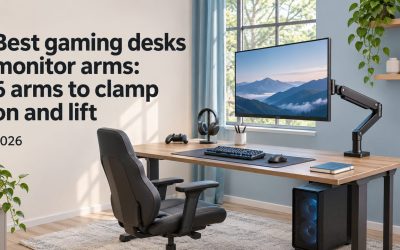
Desks do not come with monitor-ready clamp points in our data, so attaching monitors means choosing a mount for one, two or three screens, then checking that your desk is wide, deep and stiff enough. Six mounts cover the cases, from $29.99 to $119.99.
- Best single arm from a big brand line: HUANUO FlowLift Single Monitor Mount, approx. $38.99 on Amazon (Nov 11, 2026)
- Best mount for two screens: HUANUO FlowLift Dual Monitor Stand, approx. $59.99 on Amazon (Nov 11, 2026)
- Best mount for three screens: HUANUO Triple Monitor Mount, approx. $119.99 on Amazon (Nov 10, 2026)
- Best low-cost arm for a 34 inch screen: WALI Adjustable Single Monitor Arm, approx. $29.99 on Amazon (Nov 11, 2026)
- Best for a heavy 49 inch screen: HUANUO TitanLift Heavy Duty Monitor Arm, approx. $109.99 on Amazon (Nov 11, 2026)
- Best with a stated VESA pattern: NB SmooVex Monitor Arm, approx. $33.90 on Amazon (Nov 11, 2026)
Which desks can carry a mount
We have no clamp-thickness or load figures for the mounts, so the desk side relies on published tabletop sizes. Wide desks in our data include the SEDETA 79” at 78.8 inches and a 300 lb rating, and a Tribesigns two person desk at 78.74 inches and a 350 lb rating.
A narrow desk can hold one arm, but a triple mount needs width and a stiff top.
Monitor mount comparison table
The table shows how many screens each mount handles, the screen range in the listing, any weight figure our data has and the approximate price with its date. Amazon gave us no mount dimensions, so we leave size out and focus on the numbers that decide fit.
| Mount | Screens | Screen range (per listing) | Weight figure in the listing | Approx. price on Amazon |
|---|---|---|---|---|
| HUANUO FlowLift Single | One | 13 to 32 inches | Not listed | $38.99 (Nov 11, 2026) |
| HUANUO FlowLift Dual | Two | 13 to 32 inches | Item weight 11 lb | $59.99 (Nov 11, 2026) |
| HUANUO Triple | Three | 17 to 32 inches | Not listed | $119.99 (Nov 10, 2026) |
| WALI Adjustable Single | One | 13 to 34 inches | Up to 26.4 lb | $29.99 (Nov 11, 2026) |
| HUANUO TitanLift | One | Up to 49 inches | Holds 44 lb | $109.99 (Nov 11, 2026) |
| NB SmooVex | One | Up to 32 inches | Item weight 2.5 kg | $33.90 (Nov 11, 2026) |
How we chose these mounts and desks
We did not attach a monitor to any desk. We took the Amazon listing data from November 10 and 11, 2026, kept mounts whose listings mention a clamp, a grommet or a desk mount, and grouped them by how many screens they hold. For desk width we used published tabletop sizes only.
Six distinct mounts passed. Color or finish variants of one mount count once, such as the white gas-spring HUANUO single arm. Ratings are context, not our scores, and the order does not follow commissions.
Mounts for attaching monitors to a gaming desk reviewed
Each review explains who the mount suits, what its listing says, the trade-offs and when to buy or skip it. Screen counts and ranges come from the listings, and any desk fit comes from published widths, so confirm your monitor’s weight and VESA pattern before you order.
HUANUO FlowLift Single Monitor Mount: best single arm from a big brand line
The FlowLift Single suits a player who wants one reliable arm from a brand with a large following. The listing offers a 13 to 32 inch monitor arm with a VESA mount and clamp and grommet options, and it also sells a white gas-spring version at approx. $42.99 (Nov 11, 2026).
It was approx. $38.99 on Amazon (Nov 11, 2026) against a $47.99 list price, with 4.6 stars from about 16,635 ratings on Amazon (Nov 11, 2026), the same rating pool as the white version. Our data has no weight limit or arm reach.
It costs more than the cheapest arms here, so the extra goes to the HUANUO rating record rather than to a larger range. Check the weight limit.
- Buy if: you want one arm with a 4.6 star average.
- Skip if: your screen is above 32 inches.
HUANUO FlowLift Dual Monitor Stand: best mount for two screens
The FlowLift Dual suits players who run two monitors side by side and want both lifted off a desk. The listing describes a fully adjustable gaming monitor desk mount for 13 to 32 inch screens, mentions VESA, clamp and grommet options, and lists an item weight of 11 lb.
It was approx. $59.99 on Amazon (Nov 11, 2026) against a $69.99 list price, though an earlier listing showed $69.99 on Amazon (Nov 10, 2026). It has 4.6 stars from about 34,993 ratings on Amazon (Nov 11, 2026), the largest sample in this group.
Two screens put more load on one clamp, so the desk matters. A top near 60 inches or wider suits two screens judging by width alone, but we have not tested any pairing.
- Buy if: you run two monitors up to 32 inches each.
- Skip if: your desk edge is narrow or your top is flimsy.
HUANUO Triple Monitor Mount: best mount for three screens
The HUANUO Triple suits sim racers and multi-screen players who want three monitors in a row. The listing says it fits 17 to 32 inch screens and describes it as an adjustable gaming triple mount, which covers most common gaming monitor sizes in one purchase.
It was approx. $119.99 on Amazon (Nov 10, 2026) against a $149.99 list price, with 4.4 stars from about 14,354 ratings on Amazon (Nov 10, 2026). Our data has no weight limit or mounting type.
Three screens need a wide, strong desk. Judging by published width, the SEDETA 79” at 78.8 inches or the 93 inch GYIIYUO two person desk are the kind of top to look at, but check the mount’s spread and weight limit on the listing first.
- Buy if: you run three monitors from 17 to 32 inches.
- Skip if: your desk is under about 70 inches wide.
WALI Adjustable Single Monitor Arm: best low-cost arm for a 34 inch screen
The WALI single arm suits a large-but-standard monitor on a tight budget. The listing covers 13 to 34 inch screens up to 26.4 lb and describes full motion with tilt, swivel and rotation, plus a clamp mount, and the item weighs about 2.3 kg, so it is light to handle.
It was approx. $29.99 on Amazon (Nov 11, 2026), with 4.3 stars from about 17,808 ratings on Amazon (Nov 11, 2026), the lowest star average of the six mounts. Our data has no arm reach.
The stated 26.4 lb limit is a useful number that many listings lack, but it is lower than the 44 lb on the TitanLift. Stay well under it, and check how heavy your own screen is.
- Buy if: your screen is up to 34 inches and 26.4 lb.
- Skip if: you want a higher star average or a heavier limit.
HUANUO TitanLift Heavy Duty Monitor Arm: best for a heavy 49 inch screen
The TitanLift suits owners of a large or ultrawide monitor who worry about weight. The listing says it supports screens up to 49 inches and holds 44 lb, with an aluminum build, and the text mentions VESA and clamp mounting. It also uses the word dual, so confirm whether it handles one screen or two.
It was approx. $109.99 on Amazon (Nov 11, 2026), with 4.6 stars from about 524 ratings on Amazon (Nov 11, 2026). Our data has no list price, since it matched the sale price.
It costs more than three times the cheapest arm here, and its rating sample is small compared with the other HUANUO arms. It matters only if you need the 44 lb limit.
- Buy if: your screen is heavy, large or ultrawide.
- Skip if: a standard 27 inch monitor is all you need to hold.
NB SmooVex Monitor Arm: best with a stated VESA pattern
The NB SmooVex suits shoppers who want the compatibility spelled out in the title. The listing says it fits screens up to 32 inches with a mechanical spring and a VESA 75/100 mm pattern, and the item weighs about 2.5 kg. Its text also mentions clamp, grommet and wall wording.
It was approx. $33.90 on Amazon (Nov 11, 2026), with 4.5 stars from about 910 ratings on Amazon (Nov 11, 2026). Our data has no list price or weight limit.
The VESA note answers the first compatibility question, but it does not tell you the weight limit, and wall mounting is only a word in the text. Check how you would use it before ordering.
- Buy if: your monitor has a 75 or 100 mm VESA pattern.
- Skip if: you need a stated weight limit or a screen above 32 inches.
Buying guide for attaching monitors to a gaming desk
Match three things before you buy: the mount to the number of screens, the screen to the mount’s range and weight limit, and the mount to the desk’s edge and stiffness. Our data supports the first two, but the third needs your own measurements at home.
How many screens and which mount
One screen takes a single arm. Two screens take a dual stand like the FlowLift Dual, and three take the Triple. A dual or triple mount concentrates load on one clamp, so the desk top and edge matter more than they do for a single arm, even a heavy one.
Two single arms is another route if your desk is wide enough.
Desk width and rated load
Width tells you how far the screens spread. The SEDETA 79” is 78.8 inches wide and the Tribesigns two person desk is 78.74 inches, rated 300 lb and 350 lb. Rated load covers the desk top, not the mount, and not the clamp edge. Compare both figures before you buy.
Without tested numbers, treat any pairing as a plan, not a promise.
Clamp, grommet and VESA details
Clamp mounts grip the desk edge, grommet mounts go through a hole, and VESA is the hole pattern on the back of the monitor. The listings mention all three, but our data gives no desk thickness limits or arm reach figures, so verify them on the listing before you order.
Measure your tabletop edge before you order.
Choosing the best gaming desks you can attach monitors to
For one screen start with the FlowLift Single or the WALI. For two screens choose the FlowLift Dual. For three, use the HUANUO Triple on a wide desk, and for a heavy 49 inch monitor use the TitanLift, if the budget allows it. Weigh your screen first.
Check each weight limit and your desk edge on the current listing before ordering.
FAQ
These answers cover common questions about attaching monitors to a gaming desk. They draw on the listing data above and published desk widths, not mounted setups, so check the current listing for weight limits, VESA patterns and desk-edge requirements before you buy.
Can you attach monitors to a glass gaming desk?
Our data does not say. The mount listings mention clamp and grommet wording but give no tabletop material rules, and glass tops can crack under a clamp. Check the mount’s instructions and the desk’s own listing before attaching anything to a glass top.
How wide should a desk be for two monitors on a dual mount?
Judging by published widths alone, a top of around 60 inches or more gives two 27 inch screens room, while 47 to 55 inch desks suit one. That is an estimate from specifications, not a tested fit, so measure your screens and the mount’s spread yourself.
Is it better to use two single arms or one dual stand?
Neither is clearly better in our data. A dual stand like the FlowLift Dual costs less than two single arms and uses one clamp, while two arms spread the load across two points. Choose by price, the spacing you want, and your desk’s edge. Both routes work.
Conclusion
For most desks, the HUANUO FlowLift Single is the best one-screen mount and the FlowLift Dual is the best for two. Pick the HUANUO Triple for three screens on a wide desk, or the TitanLift when the monitor is large and heavy. Verify weight limits and your desk edge first.

Write Your Review
No reviews yet. Be the first to share your experience!